Get Started
About ORDER_BY_RAND()
Key Takeaways
ORDER_BY_RAND() in MySQL can cause performance issues. The query becomes more computationally expensive as the database size increases, impacting user experience and server load.
WP Engine replaces ORDER BY RAND with ORDER BY 1 for efficiency. This replacement query can be cached, reducing strain on the server and improving performance.
Consider caching randomized results for 5-15 minutes to scale with traffic. Using Transients can help manage the impact of ORDER_BY_RAND() on server resources.
Leaders should evaluate the necessity of enabling ORDER_BY_RAND() based on performance needs and database size.
If you’ve ever been exploring in the WP Engine section of your WordPress® Admin Dashboard, you’ve probably noticed a setting lower down in the “Advanced” section called for Allow ORDER_BY_RAND().1 In this article we will explain what ORDER_BY_RAND() is, why it’s disabled by default, and what you can expect when enabling it.
MySQL ORDER_BY_RAND()
The MySQL option to ORDER_BY_RAND() is made to allow users to randomly order items in a list, and use the “LIMIT 1” option to print a randomized item from that list.
For example, if I wanted to print out the post title of a random item in my wp_posts table, I could run the following query:
SELECT `post_title` FROM `wp_posts` ORDER_BY_RAND() LIMIT 1;
That would print out the title of a random post in my wp_posts table. This is fine if I only have about 1000 rows in my wp_posts table. However, the query becomes exponentially more computationally expensive due to its inefficiency the more rows the database has.
Running the query in my wp_posts table of 222 posts, it took 14.1ms, but on a wp_posts table with over 150,000 rows, it took 258ms. If you have a large database and are looking to randomize a result for every single visitor to your website, this can easily slam MySQL with slow queries. This in turn causes slow performance for your end users and potentially cause high CPU load and Memory usage.
WP Engine and ORDER_BY_RAND()
By default, WP Engine disables the ORDER_BY_RAND() sorting option for MySQL. This is because ORDER_BY_RAND() is a highly inefficient query, and is known to cause poor performance. Instead, we replace ORDER BY RAND in SQL queries with ORDER BY 1.
While the performance of this query is about the same as ORDER_BY_RAND(), it can be cached instead of randomizing all rows, and returning a new result every time for every user.
If ORDER BY RAND is enabled instead, it’s recommended to cache the results for 5-15 minutes in order to reduce stress on the server, and call that cache instead of initiating a new query with every search.
Enabling ORDER_BY_RAND()
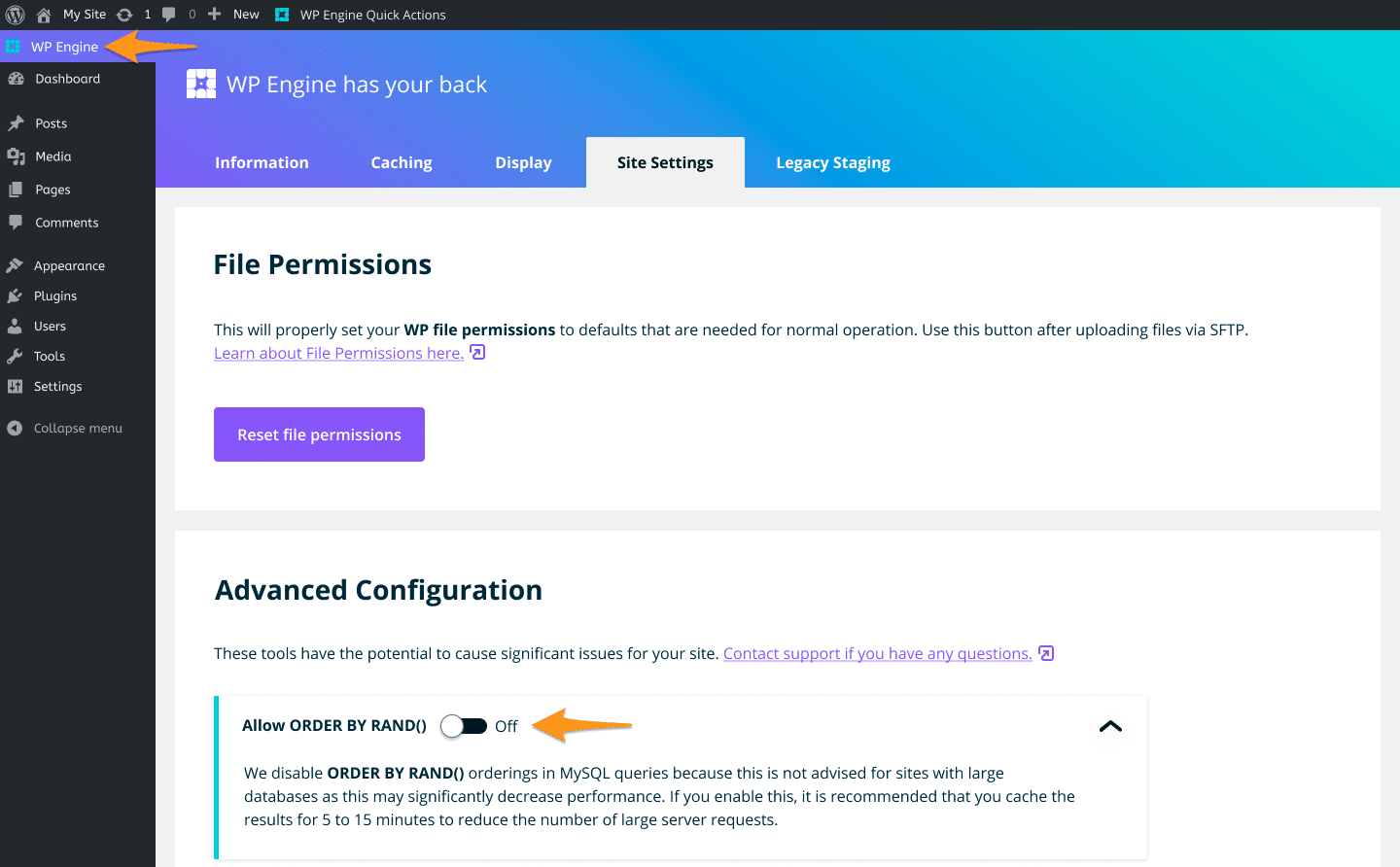
If you need to use the ORDER_BY_RAND() function in MySQL, you do have the option to enable it. You will find the toggle for this function in your WordPress Admin Dashboard, under the WP Engine plugin tab.
Select the Site Settings tab and you will see the option to enable the setting Allow ORDER_BY_RAND().
Considerations
When using ORDER_BY_RAND() there are some caveats to consider:
- Firstly, we recommend caching your randomized result using a Transient. You can set a Transient expiration time of 5-15 minutes. This in turn can help ensure your queries scale with excess traffic.
- If you experience any conflicts or unexpected behavior with your Transient, consider turning off Object Caching.
- Remember that the page generated by PHP will be cached for 10 minutes in our proprietary page caching system (Evercache). This means a randomized result will still obly show every 10 minutes for your new users.
NEXT STEP: Learn about WP Engine caching